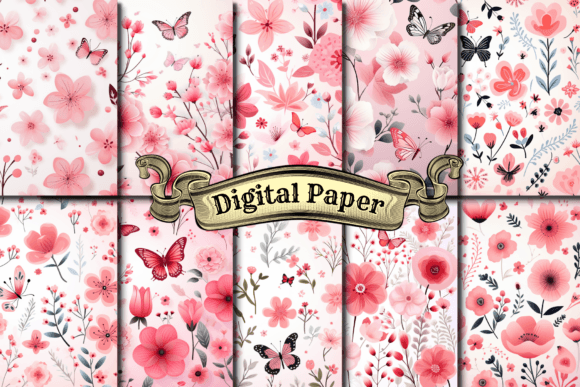
Watercolor Floral Digital Papers for Practical Creative Workflows
Watercolor floral digital papers occupy a specific and valuable space in modern content creation and design work. Unlike raw photography or rigid vector patterns, these assets combine the organic texture of hand-painted watercolor with the flexibility of digital files. For anyone who produces visual materials regularly, understanding where these papers fit and how to use them effectively can save time, improve consistency, and elevate the quality of finished work without adding complexity to the process.
At their core, watercolor floral digital papers are high-resolution digital files that replicate the look of watercolor paint on paper, featuring floral motifs, botanical elements, and layered washes of color. They are typically delivered as JPEG, PNG, or PDF files and can be used as backgrounds, textures, overlays, or design elements across many types of projects. The real value lies not in the files themselves, but in how they integrate into a workflow and solve specific visual problems.
Where Watercolor Floral Digital Papers Fit in a Creative Process
Every creative project follows a sequence of decisions and actions, from initial concept to final output. Watercolor floral digital papers are most useful during the asset selection and layout phase, after the concept is established but before the final production begins. They serve as a ready-made visual layer that can be adapted quickly, eliminating the need to create hand-painted elements from scratch or source physical materials.
In a typical workflow, you might start with a mood board or color palette, then move into content arrangement. At that point, selecting a watercolor floral paper as a background or accent element gives you an immediate texture and tone that sets the direction for the rest of the design. Because the papers are digital, they can be scaled, rotated, layered, and combined without losing quality, which makes them suitable for both print and screen applications.
This is especially relevant for small business owners and solopreneurs who handle design themselves. Instead of commissioning original watercolor art for every project, a curated collection of digital papers provides a consistent visual language that can be reused across product packaging, social media graphics, website headers, and promotional materials. The result is a cohesive brand presence that looks artisanal without requiring a background in illustration.
Integration with Other Tools and Resources
Watercolor floral digital papers are not standalone assets. Their real utility emerges when they are combined with other tools, platforms, and methods. Understanding this interaction is essential for getting the most out of them.
Graphic Design Software
Most designers use these papers inside programs like Adobe Photoshop, Canva, Affinity Designer, Procreate, or even Microsoft PowerPoint and Keynote. The key consideration is file compatibility and resolution. Before purchasing or downloading a set, verify that the file format matches your primary editing software. PNG files with transparent backgrounds are particularly useful for layering over other images or text, while high-resolution JPEGs work well as full-page backgrounds.
When using these papers in Canva, for instance, you can upload them as brand assets and apply them to templates with a single click. This drastically reduces the time spent on background design for social media posts, flyers, or presentations. In Photoshop, you can blend multiple papers using layer masks, adjustment layers, and blending modes to create custom textures that match your exact color scheme.
Print-on-Demand and E-Commerce Platforms
For entrepreneurs running print-on-demand businesses, watercolor floral digital papers are a practical way to differentiate products. You can upload them to platforms like Printful, Printify, or Redbubble as pattern fills for phone cases, notebooks, tote bags, and apparel. The key is to test how the paper renders on different product substrates, as watercolor textures can appear differently on fabric, ceramic, or coated paper.
Before committing to a large product line, order samples and evaluate color accuracy and texture clarity. This quality control step prevents customer dissatisfaction and saves money in the long run. It also helps you refine which papers work best for each product category.
Digital Planners and Stationery
Watercolor floral digital papers have become a staple in the digital planner community. Many creators use them as page backgrounds, divider pages, or sticker sheets within apps like GoodNotes, Notability, and Xodo. The organization of these files is critical here: naming conventions, folder structures, and thumbnail previews determine whether you can find the right paper quickly during a planning session.
A practical workflow is to sort papers by color family or season, then import them into your planner app as a custom sticker book or background set. This keeps your planning process smooth and visually consistent without requiring design work each time you start a new month.
Practical Implementation Tips for Everyday Use
Getting started with watercolor floral digital papers is straightforward, but there are several practices that separate efficient use from frustrating experimentation.
- Start with a cohesive set. Instead of collecting individual papers from multiple sources, choose a curated collection that shares a consistent color palette and art style. This ensures that any combination you create will look intentional and harmonious.
- Use color sampling. Most watercolor floral papers contain a range of hues. Use the eyedropper tool in your software to extract accent colors from the paper itself, then apply those colors to text, borders, or icons. This creates a unified design with minimal effort.
- Layer with transparency. Apply a paper as a background, then reduce its opacity to 30–50% if it competes with text or other elements. This technique preserves the watercolor texture while keeping your content readable.
- Crop and scale deliberately. Avoid stretching a paper beyond its original dimensions, which can introduce pixelation. Instead, crop to the area that best matches your layout, or use the paper as a tileable pattern if the set includes seamless options.
- Create a master template. Once you have a layout that works, save it as a template file with the watercolor paper embedded. This allows you to produce multiple outputs, like weekly social media posts or product mockups, by simply swapping the content rather than rebuilding the design each time.
Preparation and Organization for Long-Term Use
The longevity of watercolor floral digital papers in your workflow depends largely on how you organize and maintain them. A disorganized asset library leads to wasted time and duplicated effort.
Begin by establishing a clear folder structure on your computer or cloud storage. One approach is to organize by theme, such as seasonal (spring, autumn), color family (pastel, jewel tones), or usage (backgrounds, overlays, elements). Within each folder, name files descriptively so you can search for them later. For example, watercolor-floral-paper_rose-pink_12x12 is far more useful than img_045.
If you work with a team or share assets across devices, consider using a digital asset management tool or a shared cloud folder with synchronized access. This ensures everyone pulls from the same set of approved materials, maintaining brand consistency across projects.
Another often-overlooked factor is backup and licensing. Store your purchased papers in at least two locations, such as your hard drive and a cloud service. Also, review the license terms before using the papers in commercial products. Some collections are royalty-free for personal and commercial use, while others require attribution or limit the number of copies you can produce. Knowing this upfront prevents legal complications later.
Quality Control and Consistency Across Projects
When using watercolor floral digital papers repeatedly, maintaining visual quality and consistency requires attention to a few technical details. Resolution is the most important factor. Papers intended for print should be at least 300 DPI at the final output size. For screen use, 150 DPI is usually sufficient, but verify that the paper looks crisp on retina displays and high-resolution monitors.
Color accuracy also matters. Watercolor papers often feature subtle variations and soft transitions, which can look washed out on some screens or muddy when printed. To mitigate this, calibrate your monitor and use color profiles (such as sRGB for screen or CMYK for print) that match your output medium. If you are designing for both digital and print, create separate versions of your final file for each medium rather than relying on a single file that tries to serve both purposes.
Consistency extends beyond technical specs. If you use multiple papers from different collections in the same project, check that their artistic styles do not clash. A loose, wet-on-wet watercolor background may not pair well with a crisp, detailed floral illustration. Staying within the same collection or artist series is the simplest way to avoid this problem.
Adapting to Different Use Cases and Audiences
Watercolor floral digital papers are not limited to traditional crafts or wedding invitations. Their flexibility makes them applicable in contexts that might not immediately come to mind.
Educators and instructional designers can use these papers as backgrounds for lesson slides, worksheets, or digital handouts. The organic texture adds warmth to educational materials without distracting from the content. When selecting papers for this purpose, choose low-saturation backgrounds with minimal pattern complexity so text remains legible.
Marketers and social media managers can use watercolor floral papers to create visually cohesive campaign assets across multiple platforms. A single paper used as a background for Instagram posts, email headers, and landing page banners creates a recognizable visual thread that reinforces brand identity. For seasonal campaigns, swapping the paper color palette from spring pastels to autumn earth tones communicates the shift without redesigning the entire layout.
Bloggers and content creators often use these papers as featured image backgrounds, Pinterest pin templates, or video thumbnail overlays. The watercolor texture adds a handmade, approachable feel that resonates with audiences looking for authentic content. Pairing the paper with clean sans-serif typography creates a balanced contrast between organic and modern.
Long-Term Value and Sustainability in Your Workflow
Watercolor floral digital papers are not a one-time purchase or a passing trend. When chosen well and managed properly, they become a reusable resource that supports hundreds of projects over several years. Their durability in a workflow depends on how well they integrate with your evolving needs, tools, and creative direction.
To sustain their usefulness, periodically review your collection and retire papers that no longer align with your brand or style. This keeps your library lean and relevant. You can also repurpose old papers by applying new color overlays or combining them with other textures to create fresh looks without buying new assets.
Finally, consider contributing to the community by sharing your own tips or templates built around these papers. Many creators appreciate seeing real-world applications and workflow examples, which in turn helps the ecosystem grow and improve. The more people understand how to use watercolor floral digital papers effectively, the more value everyone gets from the format.
Watercolor floral digital papers are a practical tool for anyone who regularly produces visual content. By understanding their place in the creative process, integrating them with the right software and platforms, and applying consistent organizational and quality control practices, you can use them to produce polished, professional work without unnecessary complexity. The key is to treat them not as standalone decorations, but as intentional components of a larger, well-planned workflow.