Why the 6 x 9 Book Standing on Edge Mockup Holds More Power Than You Think
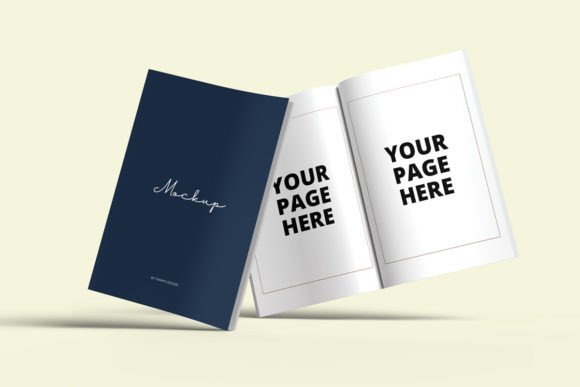
If you’ve ever tried to present a book cover to a client, an audience, or even just your Instagram followers, you know that flat digital files rarely do the work justice. A cover looks one way on a screen and entirely different when it’s part of a physical object. That’s where the 6 x 9 book standing on edge mockup steps in. It’s not just a decorative image—it’s a tool that helps bridge the gap between a design file and the real-world experience of holding a book. And for anyone creating, marketing, or selling books, that small visual shift can make a big difference.
The quiet workhorse of book marketing
The 6 x 9 format is one of the most common trim sizes in publishing. It’s the size of countless novels, memoirs, self-help titles, and business books. When you see a book standing on its edge, you’re seeing it the way a shelf browser would—spine out, title visible, and just enough of the front and back cover to hint at the full design. A mockup in this position serves a specific purpose: it shows how your book will look in the wild, on a shelf, in a bookstore, or on a desk.
For independent authors, this is especially useful. You don’t have a publishing house behind you with a marketing team and a catalog. You have your own effort and a few digital tools. A standing-on-edge mockup gives you a way to present your book as a finished product, even before it goes to print. It signals professionalism and intent. And when used on a website, a crowdfunding page, or a promotional post, it helps potential readers imagine the book in their hands—or on their own shelf.
Beyond the author: Who else reaches for this mockup?
It’s tempting to think this is only for authors, but the real range of users is broader. Cover designers, for instance, often keep a library of mockups for different trim sizes. When presenting options to a client, a flat JPEG doesn’t tell the whole story. A 6 x 9 book standing on edge mockup allows the designer to show how the spine aligns, how the front wraps around, and how light plays across the surface. It turns a proof into a presentation.
Publishers, too, rely on this format for catalog submissions and sales sheets. A trade publisher preparing a seasonal catalog will need to show dozens of titles in a consistent, readable format. Standing-on-edge shots allow for compact layouts while still communicating the physical presence of each book. It’s efficient, scannable, and familiar to anyone who has ever shopped for books in a store.
Book bloggers and influencers also find value here. When reviewing a title that hasn’t yet arrived in the mail, a mockup can stand in for the real thing in a flat lay or a story post. It’s a way to create visual content around a book before you actually own a copy. And in a content cycle that moves fast, that head start matters.
Scenarios where the mockup becomes essential
Imagine you’re running a preorder campaign. You want to generate early buzz, but you don’t have physical copies yet. You need something that looks real enough to convince people the book is on its way. A flat cover image might work, but a 6 x 9 book standing on edge mockup adds dimension. It suggests weight and substance. It tells the viewer that this is a real object, not just a digital idea.
Or consider the author who speaks at conferences. You might have a slide deck with your book cover embedded, but a three-dimensional mockup placed on a virtual podium or desk in the slide creates a different impression. It contextualizes your work. It says, “This is what I’ve made, and it stands on its own.” That subtle visual cue can influence how an audience perceives your authority on the subject.
There’s also the practical case of formatting proofs for feedback. If you’re working with an editor, a beta reader, or a designer, showing the book standing on its edge helps them assess spine width, type placement, and whether the title reads clearly at a glance. These are details that matter for usability but are easy to overlook in a two-dimensional view.
Different users, different benefits
For a self-publisher, the benefit is credibility. You’re competing with traditionally published books that have full marketing support. A professional-looking mockup helps close that gap. It doesn’t replace a great book or a solid launch plan, but it removes one more visual tell that you’re working without a team.
For a designer, the benefit is control. By using a 6 x 9 book standing on edge mockup, you can test different lighting, backgrounds, and angles without reshooting. You can iterate quickly and present options that feel polished. That efficiency translates to better client relationships and faster turnaround.
For a marketer, the benefit is consistency. When you’re building a brand around a series or an imprint, having a standard way to present each title creates visual cohesion. A row of books shown in the same mockup style becomes a visual signature. It’s recognizable. It builds trust over time.
For an educator or academic, the benefit is clarity. If you’ve contributed a chapter to an edited volume or published a monograph, a mockup can go on your departmental website or your conference materials. It’s a concrete way to show your work without requiring a photo shoot or a physical copy for every purpose.
What to consider before choosing a mockup
Not all mockups are created equal. The 6 x 9 book standing on edge mockup you pick should match the actual dimensions of your book. This sounds obvious, but if your book has a slightly different spine width due to page count, the mockup might look off. Pay attention to the flexibility of the template. Some mockups allow you to adjust the spine thickness, which is crucial for accuracy.
Lighting matters too. A mockup with harsh shadows or unrealistic reflections can undermine the professional impression you’re trying to build. Look for mockups that use soft, natural lighting. They blend better into websites, social media, and print materials. If you plan to use the mockup repeatedly—across different platforms and contexts—neutral lighting gives you the most versatility.
Resolution is another consideration. A low-resolution mockup may look fine on a phone screen but pixelated on a laptop or in a printed brochure. Always check the output size before committing to a template. For most marketing use, 3000 pixels on the longest side is a good baseline.
Customization range also matters. Some mockups let you change the background color, add reflections, or adjust the perspective. Others are fixed. Think about where you’ll use the image most. If it’s going on a white website background, a mockup with a transparent background option is extremely handy. If it’s for Instagram, a mockup with a subtle surface shadow might work better.
Strengths and honest limitations
The biggest strength of a standing-on-edge mockup is its familiarity. People recognize this view from bookstores and libraries. It triggers an immediate association: this is a book, and it is ready to be picked up. That psychological shortcut is valuable in marketing.
Another strength is comparison. If you’re showing a series or a set of related titles, displaying them side by side in the same mockup style helps viewers compare spines and titles quickly. It’s an efficient visual directory.
But there are limitations. A mockup is not a photograph. Even a high-quality one can feel generic if used too widely. If every author in your genre uses the same mockup style, your book might blend in rather than stand out. Consider customizing the environment—adding a prop, a unique background texture, or a subtle color tint that matches your cover palette. Small tweaks can make a generic template feel personal.
Also, a standing-on-edge mockup shows limited cover real estate. If your cover relies heavily on a striking front image or intricate back-cover copy, this view may not showcase those elements well. In that case, combining a standing mockup with a flat front cover shot gives you the best of both worlds.
Making it work for your project
The value of a 6 x 9 book standing on edge mockup isn’t in the file itself. It’s in how you use it. One well-placed mockup on a landing page can increase the perceived professionalism of your project. A set of mockups used consistently across social media, email signatures, and press kits can reinforce your brand. And when you’re working with a limited budget or timeline, it can replace an expensive product photo shoot without sacrificing quality.
The next time you’re preparing to share your book with the world, consider not just what the cover looks like, but how you present it. A mockup is a small investment that pays back in clarity and confidence. And for anyone who cares about how their work is perceived, that’s a trade worth making.