The Versatility of Water Surface Texture Background in Digital Design
Water surface texture backgrounds have become a staple in digital design, offering a natural, dynamic element that can transform a flat interface into an immersive experience. Whether used as a subtle overlay or a primary visual element, these textures capture the essence of fluid motion, light refraction, and organic patterns. Understanding their characteristics and applications allows creators to leverage their potential effectively across various media. This article explores the practical aspects of water surface textures, from their visual properties to real-world use cases, providing insights for professionals and hobbyists alike.
Visual Characteristics That Define Water Surface Textures
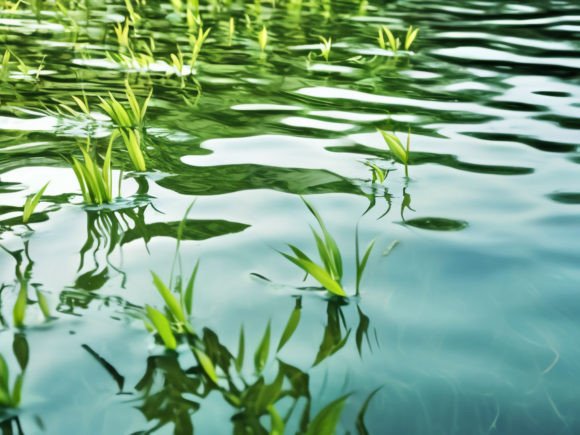
The appeal of a water surface texture background lies in its unique interplay of light, movement, and transparency. Unlike solid surfaces, water is never static; even when calm, it carries microscopic ripples and reflections that shift with changing angles. Key characteristics include:
- Reflectivity: Water acts as a mirror, reflecting surrounding environments, which adds depth and realism to backgrounds. This property makes textures appear luminous and dynamic.
- Transparency and Depth: Layers beneath the surface, such as pebbles or aquatic plants, can be partially visible, creating a sense of volume. Textures often simulate this by blending translucent gradients with subtle shapes.
- Ripple Patterns: Concentric rings, wave crests, and irregular disturbances produce organic patterns that break uniformity. These patterns are crucial for avoiding visual monotony.
- Color Variations: Water absorbs and scatters light, resulting in hues ranging from deep blues and greens to turquoise and silver. These colors can be tuned to evoke specific moods, such as calmness or energy.
- Surface Tension Effects: Droplets, bubbles, or floating debris add granular detail, enhancing photorealism. Even subtle texture overlays benefit from such micro-details.
For designers, replicating or capturing these characteristics requires either high-resolution photography or digital simulation. A well-crafted water surface texture background balances all these elements without overwhelming the primary content.
Advantages of Integrating Water Textures in Creative Work
Using a water surface texture background offers distinct advantages over solid colors or generic gradients. First, it introduces organic irregularity that mimics nature, which can soften rigid digital layouts. Second, the reflective quality adds a layer of sophistication, making designs appear more premium and considered. Third, water textures are highly versatile: they work as full-page backgrounds, section dividers, or subtle overlays that do not compete with text. Moreover, they evoke psychological responses—blue water tones are associated with tranquility and clarity, while vibrant turquoise suggests vitality and freshness. These emotional cues can strengthen brand identity or user experience without overt messaging.
Another practical advantage is scalability. When created as seamless tiles, water textures can be repeated across large surfaces without visible joins, making them suitable for websites, mobile apps, and print materials. Advances in procedural generation also allow designers to adjust parameters like wave height, color saturation, and reflection intensity in real time, offering unprecedented control.
Key Use Cases Across Different Industries
The application of water surface texture backgrounds spans numerous fields, each leveraging the texture for distinct purposes:
Web and User Interface Design
In web design, water textures are used as hero section backgrounds or loading screens to capture attention immediately. For example, a travel website might use a gentle water surface with soft ripples to evoke a beach destination, while a meditation app employs deep, still water to promote calm. UI designers often apply water textures as subtle overlays on cards or buttons to add tactility without distracting from functionality. Performance is a consideration: compressed textures and CSS gradients can mimic water effects with minimal bandwidth.
Photography and Video Production
Photographers use water surface texture backgrounds for compositing product shots, especially for cosmetics or luxury goods. A glass bottle placed on a rippled water surface background instantly suggests purity and freshness. In video, water textures serve as dynamic backgrounds for title sequences, abstract animations, or transitions. Motion graphics artists often blend real water footage with procedural textures to create surreal visuals that convey flow and change.
Gaming and Virtual Environments
In game development, water surface textures are essential for creating believable lakes, oceans, and pools. Real-time shaders simulate wave movements and reflections, while static textures are used for background elements or low-resolution settings. Indie developers might use tiled water textures to build atmospheric levels without heavy computational costs. The balance between photorealism and artistic style matters here: stylized games might prefer painterly water textures over realistic ones.
Architectural Visualization
Architects and render artists integrate water surface textures into outdoor scenes to showcase buildings near water bodies. A calm pool or reflecting pond adds context and scale, making renders more compelling. In interior design, water textures are used for digital wallpaper concepts or as background elements in mood boards. The ability to adjust transparency and color allows designers to match the texture with the overall palette.
Educational and Scientific Visualization
Educators use water surface textures to illustrate concepts like wave propagation, light refraction, and fluid dynamics. A clear water background with visible distortions helps explain physics phenomena. Researchers might generate controlled water textures for simulations that study erosion or pollutant dispersion. These use cases require high accuracy and often rely on procedurally generated textures rather than photographs.
Techniques for Acquiring or Creating Water Surface Textures
Creators can obtain water surface texture backgrounds through several methods, each with trade-offs in quality, control, and effort:
- Stock Photography and Libraries: Hundreds of royalty-free water textures are available online, ranging from macro shots of ripples to aerial views of oceans. These are quick to use but may require adjustments for seamless tiling. Look for high-resolution images with minimal compression artifacts.
- Generative AI and Algorithms: Tools like stable diffusion models or specialized plugins can create unique water patterns from text prompts or parameter adjustments. AI-generated textures offer novelty and infinite variations but may need post-processing to ensure realism.
- Procedural Software: Programs like Substance Designer, Blender, or Photoshop allow users to build water textures from scratch using noise patterns, filters, and blending modes. This method gives full control over ripple scale, color, and transparency, making it ideal for custom projects.
- Real-World Photography: Capturing your own water textures with a camera or smartphone is accessible to anyone. Fill a shallow container with water, use a dark base for contrast, and capture ripples created by drops or wind. Post-processing can enhance colors and remove reflections. This approach yields authentic textures that mimic natural imperfections.
When choosing a method, consider the end use. For web backgrounds, smaller file sizes are important; for print, higher DPI is necessary. A water surface texture background intended for tiling should have consistent brightness and no visible edges.
Important Considerations for Effective Application
To use water surface textures successfully, designers must address several factors:
- Resolution and Scaling: Low-resolution textures appear pixelated when stretched. Always use textures at least 1920x1080 pixels for full-screen backgrounds, and opt for scalable vector formats where possible.
- Seamlessness: For repeating patterns, ensure the texture tiles without hard edges. Most photo editing software has “offset” filters that help identify seams. Procedural textures often tile automatically.
- Color Harmony: The dominant color of the water texture must complement the overall design. Warm-toned water (golden hour reflections) may clash with cool color schemes. Test the texture against your palette before finalizing.
- Overlay Intensity: When used as an overlay, water textures should be subtle—reduce opacity, blur the texture, or use blending modes like “Overlay” or “Soft Light” to avoid obscuring content.
- Lighting Consistency: If the texture includes reflections or highlights, ensure the light source direction aligns with other elements in your design. A mismatch breaks the illusion of realism.
- License and Attribution: Always verify usage rights for stock textures. Some require attribution or restrict commercial use. Creating your own or using CC0 resources avoids legal issues.
Another oversight is ignoring the context of use. A highly detailed, contrasty water texture might look stunning on a photography portfolio but distract on a text-heavy blog. Evaluating the hierarchy of visual elements helps decide how dominant the texture should be.
Observations from the Field: Examples and Best Practices
In practice, the most effective water surface texture backgrounds often draw from real-world observations. For instance, a texture capturing the “cat’s paw” effect—ripples caused by sudden wind on still water—adds energy without being chaotic. Designers who study water in natural settings notice that shadows and highlights are rarely uniform; replicating that unevenness makes digital textures feel alive.
A common mistake is over-processing: adding too many filters or layers results in an unnatural, glossy appearance. Stick to minimal adjustments: a gentle level curve, slight desaturation, and subtle blur on fine details can preserve authenticity. Another best practice is to combine water textures with masked typography—letting the texture show through lettering creates a modern, integrated look. For example, a heading on a water background with the texture clipped inside the text draws the eye and reinforces the theme.
Business owners can use water textures to differentiate their brand. A skincare company might use a clean, turquoise water background on product pages to signal purity. A wellness app could deploy a deep blue, calm water texture for its login screen to reduce user anxiety. These decisions should stem from audience research rather than aesthetic trend alone.
Finally, testing across devices is critical. A water surface texture background that looks vivid on a desktop monitor may appear muddy on a mobile screen due to color compression and brightness differences. Previewing under various lighting conditions ensures the texture performs consistently.
Water surface texture backgrounds remain a powerful resource in any visual creator’s toolkit. Their inherent diversity—from mirror-like calm to turbulent froth—offers endless possibilities for expression. By understanding the underlying principles, acquiring or creating textures thoughtfully, and applying them with context in mind, professionals and enthusiasts alike can elevate their projects with the natural elegance of water.